PaceGuard Business
Location, alerting and voice for organisations.
One platform for teams in the field: live positions, history, SOS and push-to-talk on the phones, trackers and own hardware your people already carry — with full context per position, passed on in real time to your own systems.
- 📱 Phone · tracker · own hardware
- 👥 Unlimited users
- 🇪🇺 EU cloud, dedicated or on-premise
- 🔗 Real-time into your systems
- 25+details with every position, including accuracy, connection and a spoofing flag
- 3kinds of source: phone, tracker and your own hardware, on iOS and Android
- 100%own maps, routing and elevation data — also on-premise
What PaceGuard stands for
Six principles behind every choice in the platform.
- 01Every device counts
Phone, tracker or own hardware: one platform, one data model, every device a full source.
- 02Every position in context
Accuracy, connection, battery and motion with every fix. Decide on facts, not assumptions.
- 03Real-time to your systems
Publish-subscribe, webhooks and an API. Your data flows straight to the control room, C2 or archive.
- 04People home safe
SOS is always available, the whole team is woken, and the sender knows who is coming.
- 05Scale without limits
Unlimited users and devices, scaling out as you grow, reachable worldwide.
- 06Sovereign and private
EU storage or on-premise, own maps and services. Data is never sold.
Device-first
The device comes first
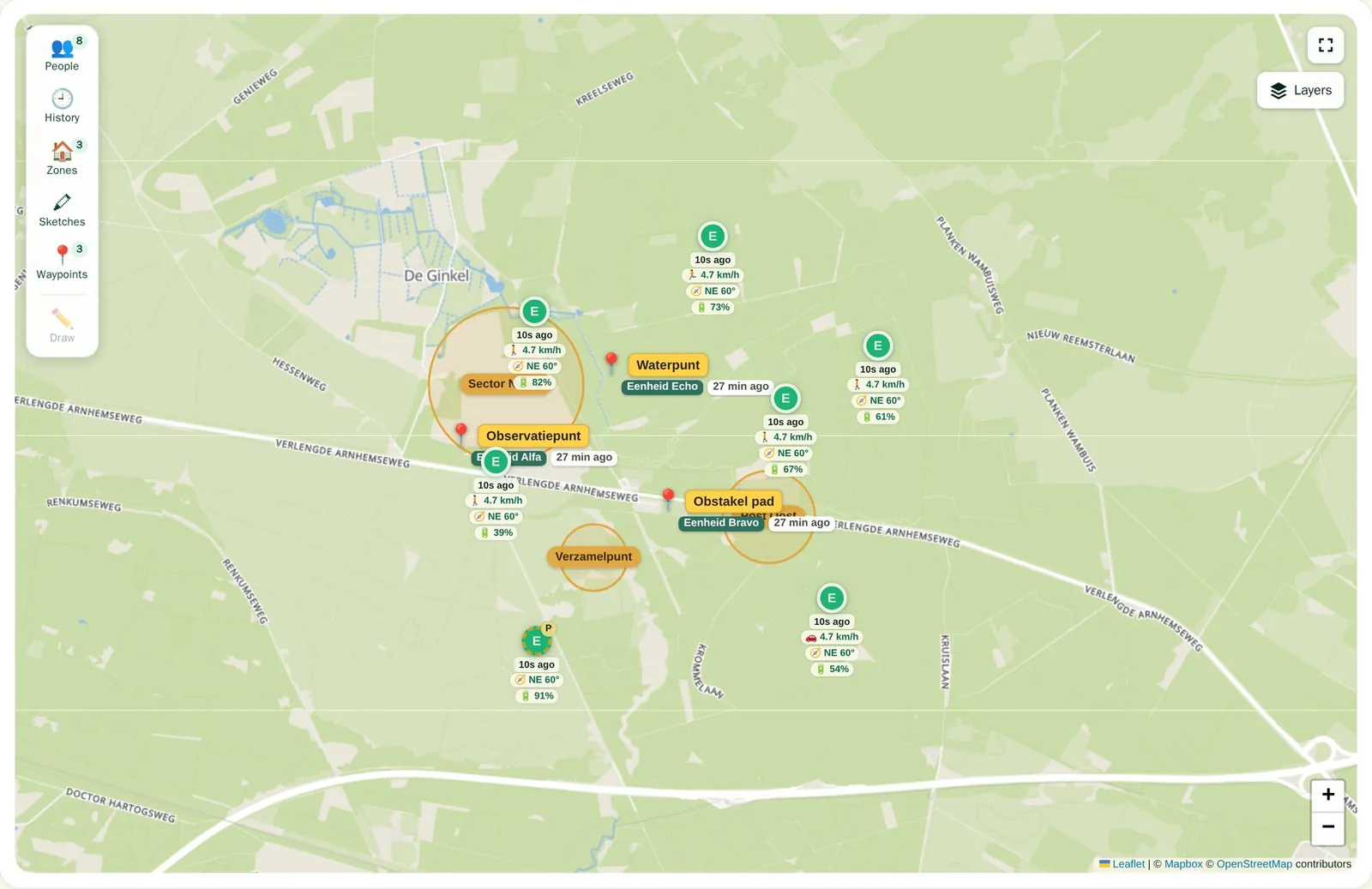
Every device is a full source, with its own identity, its own session and its own context. PaceGuard runs on the phone your people already carry, on trackers and on your own hardware.
Phones
iPhone and Android
- Live position, history and SOS
- Push and silent remote locate
- Push-to-talk, zones and waypoints
- Works over Wi-Fi or mobile data; positions without signal are kept and sent later
Trackers
The hardware you already have
- Existing trackers join through connectors
- Same map, same alerts, same history as phones
- Messages and remote locate where the tracker supports it
Your own hardware
Vehicles, sensors, equipment
- Send positions through the API or SDK
- All sources in the same data model
- Shows up next to people on the shared map
Per device
- Own identity and device type with every position
- Own session, revoked at once if a device is lost
- Remote locate per device
- Several devices per person, one profile
A watch is a bonus. Where people wear an Apple Watch, Wear OS or Garmin watch, it can share position and raise SOS from the wrist — but nothing in PaceGuard Business depends on it.
SOS & alerting
One press. The whole team knows.
An SOS wakes everyone who needs to help, on every device, even with the app closed. And the sender sees who responds.
Instantly with everyone
- SOS from any device, even without a GPS fix
- Wakes all team members and the sender's other devices, whatever the app state or distance
- Live position of the sender on the map and in the dashboard
- Spoofed positions never open an SOS
The loop is closed
- Responders reply: on my way, confirmed, help called or can't
- The sender sees who responds, with distance and arrival time
- Responding never cancels; only the sender or an admin stops the SOS
- Local emergency number per country (112, 911, …), one tap to call, even offline
Beyond the team
- SOS and responses straight to the control room or C2
- Nearby help: opted-in users within up to 25 km, on or off per organisation
- Check-in: a calm "all good" message, without an alarm
- Fall detection that raises an SOS automatically
SOS is never behind a paywall or licence limit: every user, on every device, can always raise the alarm.
Geofencing
Know who arrives and leaves where.
Draw zones on the map and get an instant alert when someone enters or leaves, on every team device and in your own systems.
Zones on the map
- Place, drag and adjust zones on the shared map
- Recipients on or off per zone and per device
- Admins set the rules for members
Who, what and when
- Alert on entry and exit
- About a person, or one specific device
- Days and time windows
- Expected arrival: an alert when someone is not there on time
Always up to date
- See live who is in which zone, and since when
- Plus how they move: walking, cycling, driving or still
- Zone moments in the history
- No false alerts from delayed or buffered positions
Entries and exits go straight to the control room or your own software, the same way as positions.
Live drawing · waypoints
The map as a shared worksheet.
With live drawing the whole team plans on the same map. Waypoints capture what stands out along the way.
Plan together on the map
- Lines, arrows, areas, circles, freehand and markers
- Everyone sees it in real time, while it is drawn
- Lifetime from 5 minutes to 7 days, or permanent
- Shown in the apps on every platform
Mark points along the way
- One tap on the device marks a waypoint
- Instantly visible to the whole team
- Straight on to your own systems
- Admins rename, delete or clear them all at once
Notifications & navigation
Instantly on every device. And the way there.
What happens on the map reaches whoever it concerns at once. Navigation happens in the app itself, on your own maps, without an external map app.
A notification for every event
- Zone entry and exit, per zone and per person
- A new drawing is on every device at once
- Waypoints, shared the moment they are set
- SOS and check-ins, also to the control room
Live navigation in the app
- Turn by turn on iOS and Android, with distance and arrival time
- To a unit, waypoint, zone or your own point
- Walk, cycle or drive, with an elevation profile
- Route and position stay within your environment
Push-to-talk
Press and talk. On every device.
A two-way radio in the device people already carry. Talk to the whole team or a group of your own, from the phone or the dashboard — and bring your radio and phone network into the same conversation.
Who hears what
- A team channel plus voice groups per sub-team
- Groups for 1 hour to 30 days, or permanent
- Admins see all groups and only ever listen in visibly
A talk button everywhere
- Phones on Android and iOS, also in the background
- The dashboard as a radio console
- SIP phones, phone exchanges and radio gateways join in through a SIP link
- Radio networks over MCPTTOn the roadmap
In control
- Floor control: one speaker per channel, the next in a queue
- Priority speakers can break in
- Every burst recorded: who spoke, when, to whom, from where
- No signal? The device is woken and the message played once it is back
Data & integration
Every position tells the whole story.
Each position carries its own context, and is kept with its original time when there is no signal. Afterwards you see exactly where coverage dropped and how reliable each fix was.
- Position & motion
- Location and altitude
- Speed and heading
- Walking, cycling, driving
- Fix time, also offline
- Quality
- Accuracy in metres
- GPS or network
- Spoofing flagged
- Connection
- Online or not
- Wi-Fi or mobile
- Signal strength
- Device
- Device type
- Battery and charging
- App version
- Worn or taken off
- Context
- Current zone
- In the zone since
- Trip it belongs to
- Presence
Subscribe to what you need
- A live stream of positions, status and presence
- Signed webhooks with automatic retries
- Bridges to MQTT, Kafka, AMQP and Cursor-on-TargetOn the roadmap
Events to your systems
- SOS, zone entry and exit, check-ins, waypoints, presence
- Positions with full context, at a rate you set
- Several endpoints at once: control room, archive, BI
And back again
- Send positions from your own hardware through the API
- Locate a device remotely
- Message the whole team or one deviceOn the roadmap
- Ask for status from a chat channel or your own softwareOn the roadmap
An SDK and an API give read access to positions, history, zones and events, with keys you can restrict per network. History exports as GPX or JSON.
Maps & history
Own maps. Offline when needed.
Maps, routing, addresses and terrain run under our own control, inside the EU. Prepare the areas your people are heading to, and the map is there without signal.
Own geo services
- Own map tiles, worldwide with regional detail
- Own routing with ascent and descent
- Coordinate to address, without an outside service
- Elevation, relief, contour lines and 3D
Offline maps
- Frame an area in the dashboard, see the size at once
- Choose detail and layers: day, night, relief, 3D
- Assign regions to devices; they refresh when the map does
- Limits per organisation: detail, size, number of regions
Who was where, and when
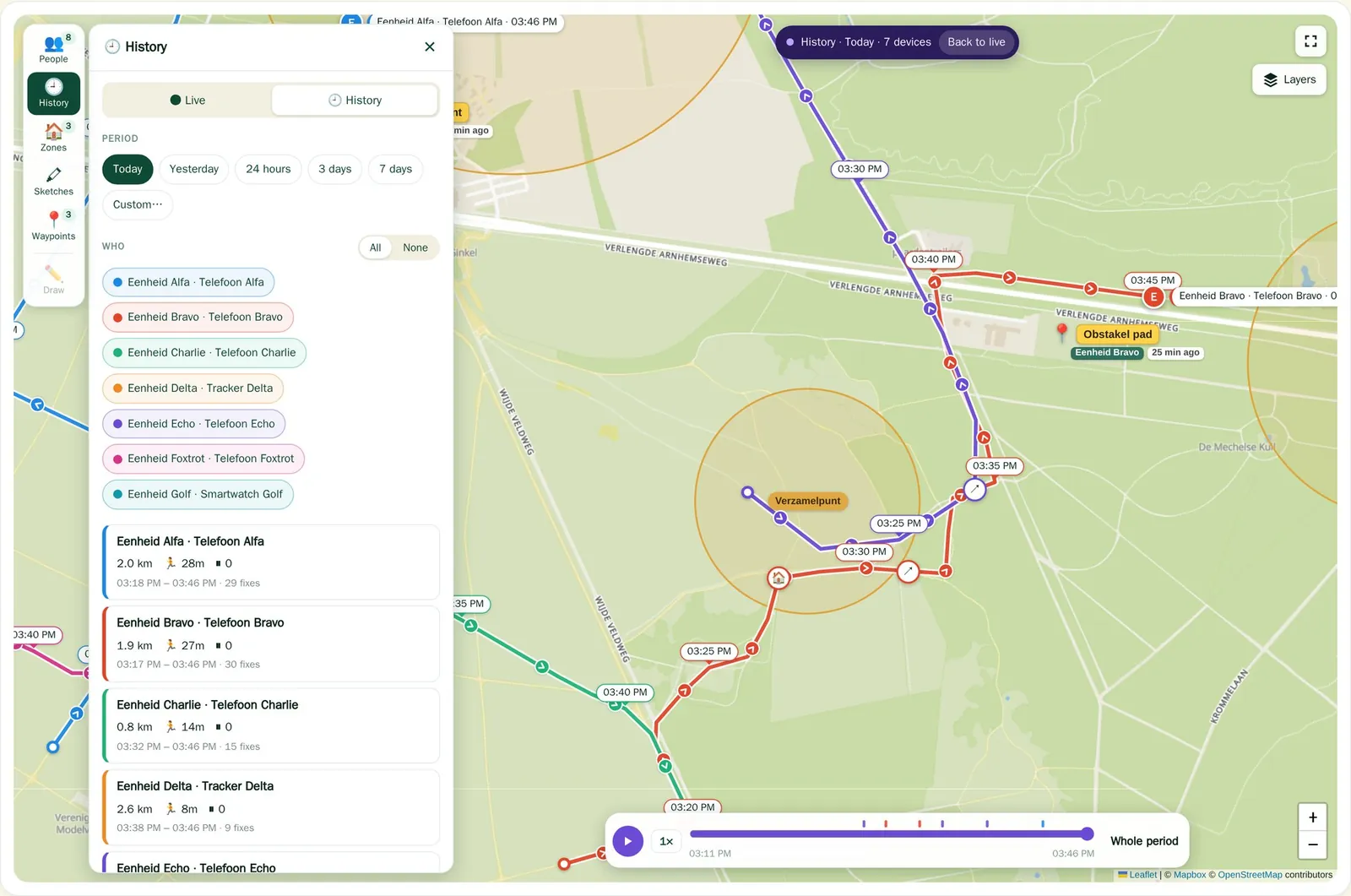
- Replay all units at once, with a timeline
- Direction and time along every route
- SOS, check-in and zone moments on the track
- Distance, duration and fixes per unit
No map, route or address request leaves for a US service. Satellite imagery from an outside provider is optional and can be switched off per environment.
Linking environments On the roadmap
Several environments. One picture.
Link PaceGuard environments together — two on-premise installations of different organisations, units or countries. Each keeps its own data and management; you decide what is shared.
- On-premise with on-premise, or with the cloud
- Share per team or group: positions, SOS, zones and voice
- Temporary or permanent, for example for a joint exercise
- The link can be cut at any time, and what was shared stays traceable
Partners & resellers On the roadmap
Scale through partners.
Resellers roll PaceGuard Business out to their own customers, with a partner portal that shows accounts, active users and revenue per customer. Resellers see figures, never locations. We are shaping it together with the first partners.
Scale, hosting & security
Grows with you. Runs where you want.
The platform scales out and is spread over several data centres with automatic failover, live in Europe and the US. Extra capacity or a new region needs no redesign.
- Quick start
EU cloud
Shared, European storage
- Data stored in the EU only
- Several data centres with failover
- A pilot within days
- Isolated
Dedicated
Your own environment and region
- Your own database and keys
- A region anywhere in the world
- A tailored SLA
- Sovereign
On-premise
In your own data centre
- Standard containers
- Own maps and geo services included
- Air-gapped variantOn the roadmap
- Linkable to other environmentsOn the roadmap
Security & privacy
- Storage in the EU only, GDPR-compliant, no trackers
- End-to-end encrypted messages
- A lost device is signed out at once
- Abuse protection and blocking built in
Management & monitoring
- Roles: owner, members and groups
- Single sign-on with your own identity provider
- Activity log, and insight into who is watching
- Continuous monitoring and a public status page
- Organisation hierarchy and SIEM exportOn the roadmap
Family Plus or Business
| Family Plus | PaceGuard Business | |
|---|---|---|
| Users | Up to 8 | Unlimited, per contract |
| Structure | One family | Teams and units, linkable |
| Hosting | EU cloud | EU cloud, dedicated or on-premise |
| Integration | Webhooks, one SDK key | Full stream and bridges |
| Linking environments | — | On the roadmap |
Getting started
Start with a six-week pilot.
A small team, your own devices, a real exercise. At the end you have the facts to decide.
- 1Discovery
Your teams, devices, systems and what has to happen when it goes wrong.
- 2Set-up
Your environment, zones, groups and links to your systems.
- 3Field exercise
The team works with it, in the field, on their own devices.
- 4Evaluation
What worked, what is missing, and a roll-out plan.
Tell us about your team, your devices and what has to happen when it goes wrong. We plan the pilot with you.
Already a customer? Mail support@paceguard.io